
Blog
Read more Articles
Keep up to date with medspa marketing strategies.

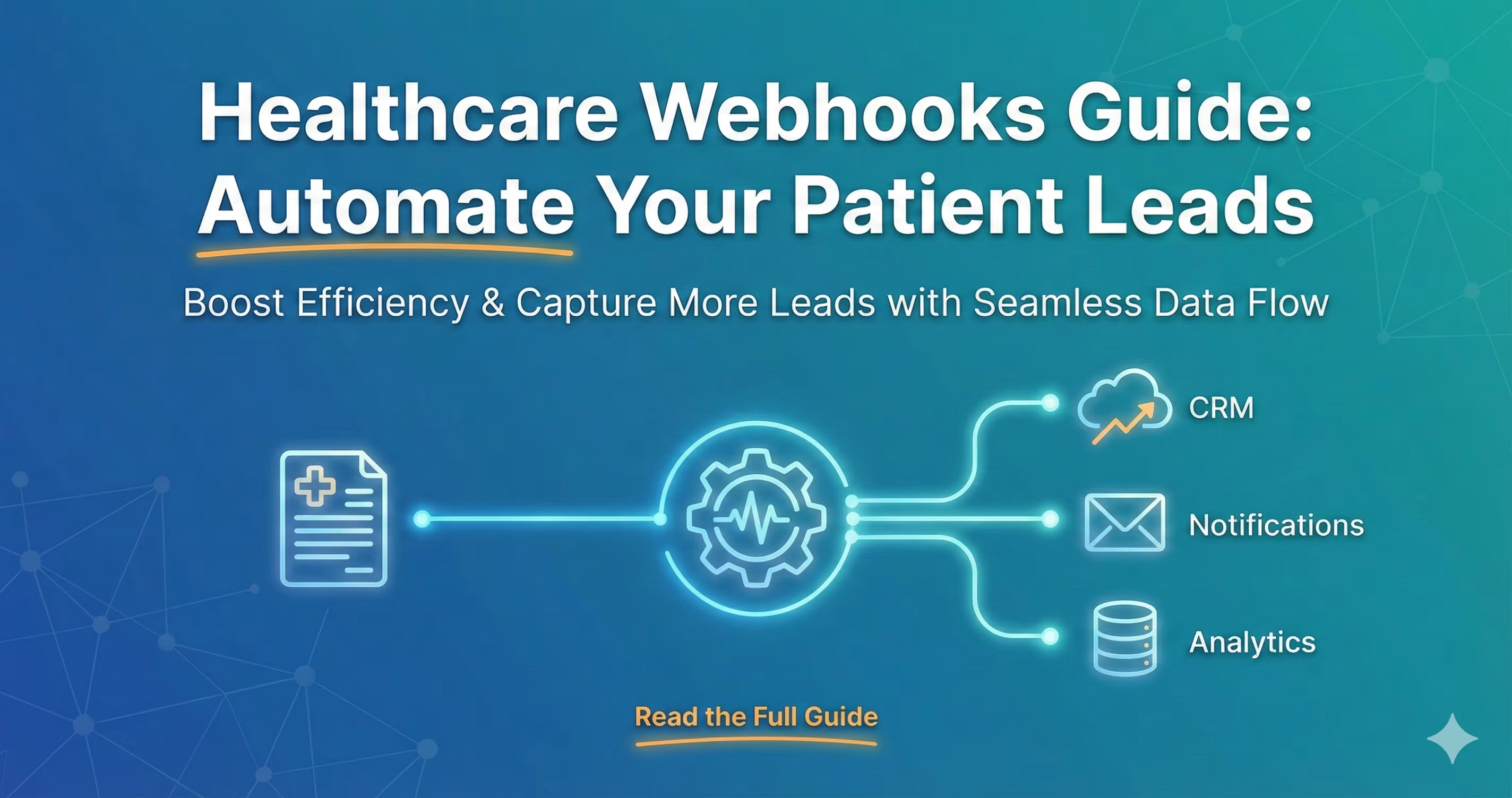
If you are doing your own marketing for your healthcare brand, you may have heard someone say “use a webhook,” which, to a lot of people, may have never heard of before. Webhooks are critical pieces to more complex marketing strategies as they are the foundation for setting up automations in your practice.
In this quick guide, I will run through everything you need to know about webhooks and how to use them effectively in your medical spa.
If you need help with your marketing, you can book a call with our team here!
A webhook may sound like fantasy technology; however, it is quite simple.
Think of this: when you sign in to Facebook, the app on your phone must send a “Payload” to the Facebook servers so it can verify your information. They know to send this “payload” to a dedicated server using a specific address.
So the Facebook servers receive something like:
{
"triggerType": "login_attempt",
"payload": {
"name": "@username",
"password": "1234",
"data": {
"First Name": "Nathan",
"Last Name": "Smith",
"Email": "Nathan@nexamed.us"
}
*Note, they get something MUCH more complex than this but, for simplicity.
This is exactly how a webhook works. You are telling the “App” (something like Optimantra, Athena Health, or Other EMRs) to send data to a specific address, AKA your newly generated webhook URL inside of your CRM or other software.
Using a webhook for your marketing strategy is a brilliant idea, and it's usually the one thing holding most people back from integrating with other apps and building more complex sales funnels.
An example of a webhook is: Imagine you decide to run healthcare ads on facebook, someone is on Facebook and sees your ad for a “$3.90/Unit Dysport Deal.” They click the ad, and they are taken out of the app to a landing page built on Framer.
They fill out the form on your landing page, which you have a webhook set up to. This will immediately send that information to your CRM so they can be followed up with.
Your CRM may see a payload that looks like this:
{
"triggerType": "form_submission",
"payload": {
"name": "Contact Form",
"siteId": "6817c30d7f81fd4000b000e0",
"data": {
"First Name": "Nathan",
"Last Name": "Smith",
"Email": "Nathan@nexamed.us",
"Phone Number": "123-456-7890",
"Website": "www.nexamed.us",
"Message": "Webhook Example!"
},
At that point, you could use a CRM to create a contact record and set up other automations using that information.
Webhooks can be used with many popular EHRs; for example, Optimantra is one of our favorite platforms to work with because it provides every trigger and all the information needed for 99% of automations.
Essentially, when a specific “trigger” happens, such as a patient booking an appointment, the webhook will automatically fire and send to your web address (CRM). From there, you could have the CRM handle email marketing and patient feedback.
For more information on how to connect your EHR to a webhook, read our blog here
Webhooks are not automatically HIPAA-compliant tools that you can use; there are steps you can take to make a webhook something that can be HIPAA-compliant.
To make a webhook safe to use for PHI, two things need to be in place.
#1: The webhook needs to have proper security. Use HTTPS/TLS 1.2+ for all webhook traffic to encrypt data in transit between systems.
#2: You will need a BAA with the company that is handling the webhook data. For example, if Zapier is handling your PHI, you will need to get them to sign a BAA with your business.
While those are the only two legal requirements, other measures, such as auditing and access controls, are often required as well to ensure PHI does not fall into the wrong hands.
In this example, we will set up a landing page so that when people fill out our form, they are sent to our CRM system for follow-up. Here is the step-by-step guide:
Before We Start Choose Our Platforms
For this example, I will use Framer and GoHighLevel, but other apps like Zapier, HubSpot, and Make serve the same function.
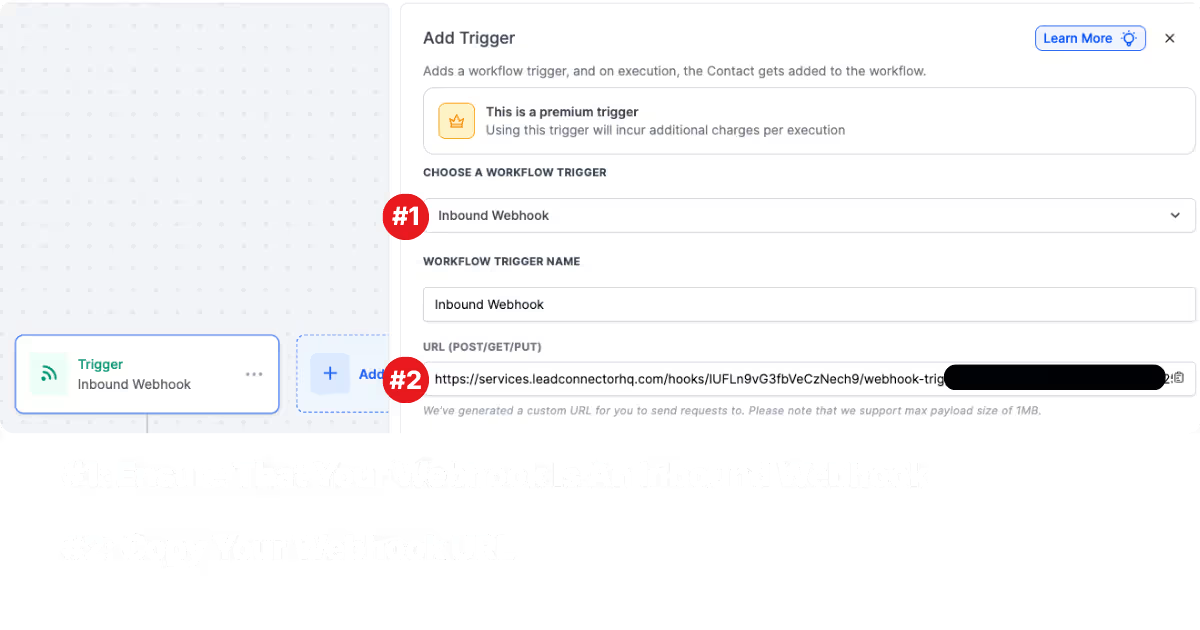
To get a new webhook in GHL, all you have to do is click automations on the right-hand side of the screen, click create a new workflow, then, as a trigger, choose a webhook. Once the screen pops up, you will see a URL.
Your webhook will look like a URL, something like this: https://services.leadconnectorhq.com/hooks/IUFLn9vG3fbVeCzNech9/webhook-trigger/d46d14000-00d-00as-dsa-0000
Once you see the webhook, copy it.
For this example, I will use Framer, but many other platforms work the same way.
I will use my copied webhook URL to locate the landing page I am using. Once I have found the landing page, I will click the form from which I want the webhook sent. Once this is clicked, I will look at the bar on the right-hand side of the screen and find the “Form” Tab. In that Tab, I will find the Send to option and click “Webhook.” When the pop-up appears, I will enter my Webhook URL and click Save.
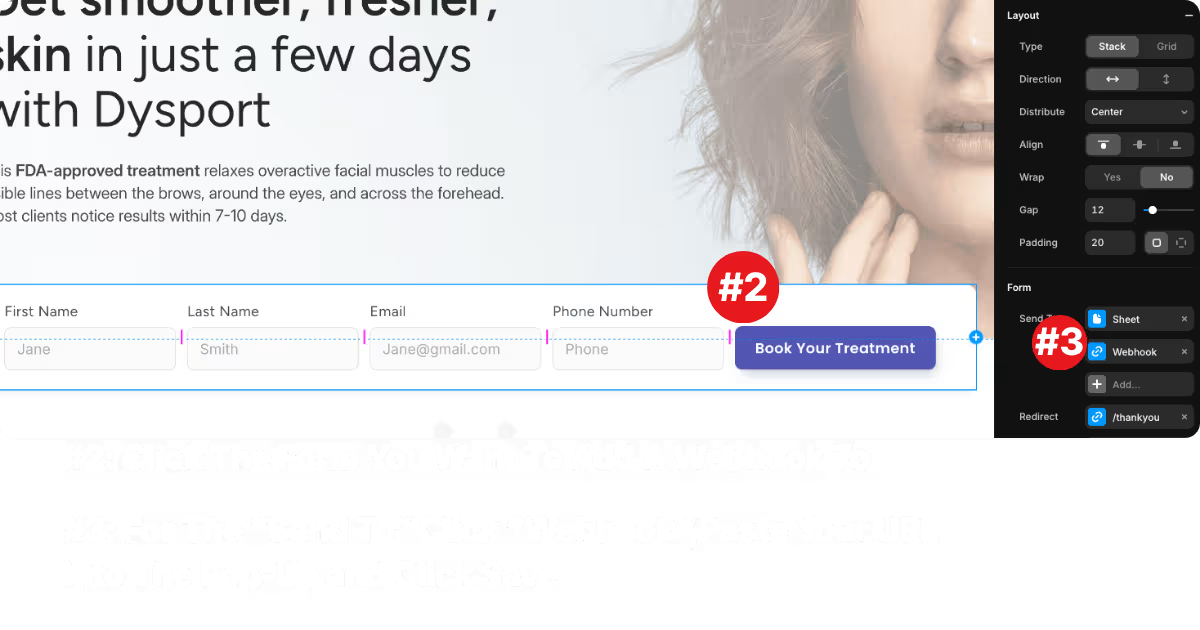
After I have successfully placed my webhook on the landing page of my choice, I will publish the landing page and fill out the form with dummy information.
You know your webhook is set up correctly when you submit the form and, on your GHL dashboard, you get a “Mapping Reference.” You may need to refresh the list to see the new one.
Once you have the mapping reference, then congratulations, you now have a webhook that is set up to your landing page of choice.
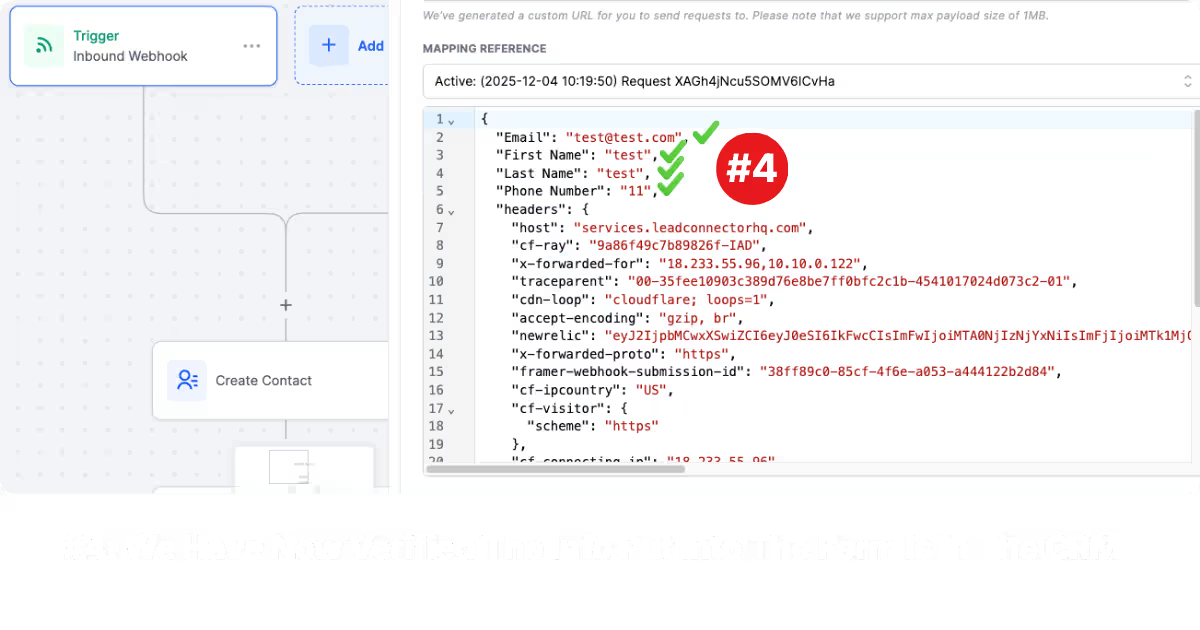
Once you have seen the payload data come through on GHL, the last step is to create a contact using that information. For other apps like Zapier, this could vary widely, but I'll show you how to do it in GHL.
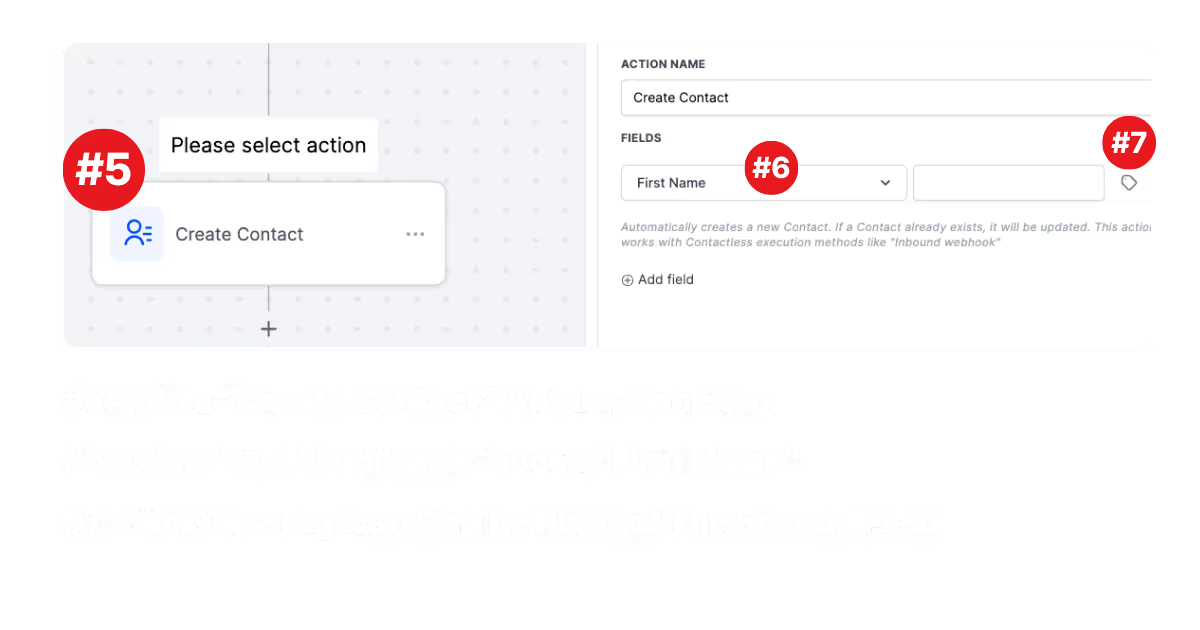
To create a contact, add another automation step called “Create a Contact.” Once you see the pop-up appear, select it, and you will be presented with a drop-down list and a list for you to enter values.
This is called “mapping,” and this is how we tell the CRM, “This value firstName is equal to our client's first name.” very simple.
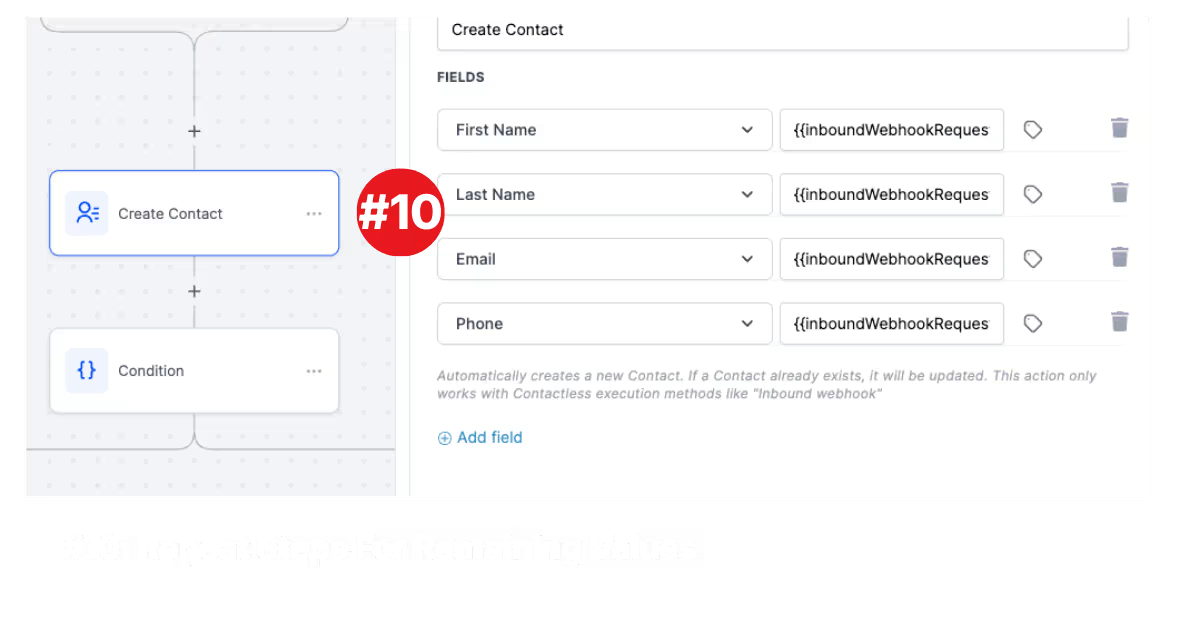
In the first field, select contact, then first name. For the field to the right of that, select the tag, then select the “Inbound Webhook Trigger.” You should then see headers labeled first name, last name, email, phone, and whatever else you had on your form.
To create the contact, just align the form values with the custom values in GHL, and that's it.
.avif)
If you want to learn how to create a med spa marketing strategy that uses webhooks, read our blog on the best med spa marketing strategy for 2026 (with results)
Stop settling for massive corporate agencies that don't understand your brand. We are a specialized team of experts dedicated to building the automated lead-gen engines that modern med spas require. Ready for predictable revenue?
You’ve outgrown "basic" marketing. Nexamed builds the advanced lead-gen infrastructure your med spa needs to capture high-ticket patients and scale without the manual mess.
Keep up to date with medspa marketing strategies.