.avif)

Blog
Read more Articles
Keep up to date with medspa marketing strategies.

Ask most practices how their Google Ads are doing and you'll hear a cost per lead. Ask which campaign produced last month's new patients and the room goes quiet.
That gap exists because two systems each hold half the story. Google Ads knows who clicked and filled out a form. Your CRM knows who answered the follow-up text, booked a consult, showed up and paid.
Unless you connect the two, Google keeps optimizing for form fills, including those that never result in a booking.
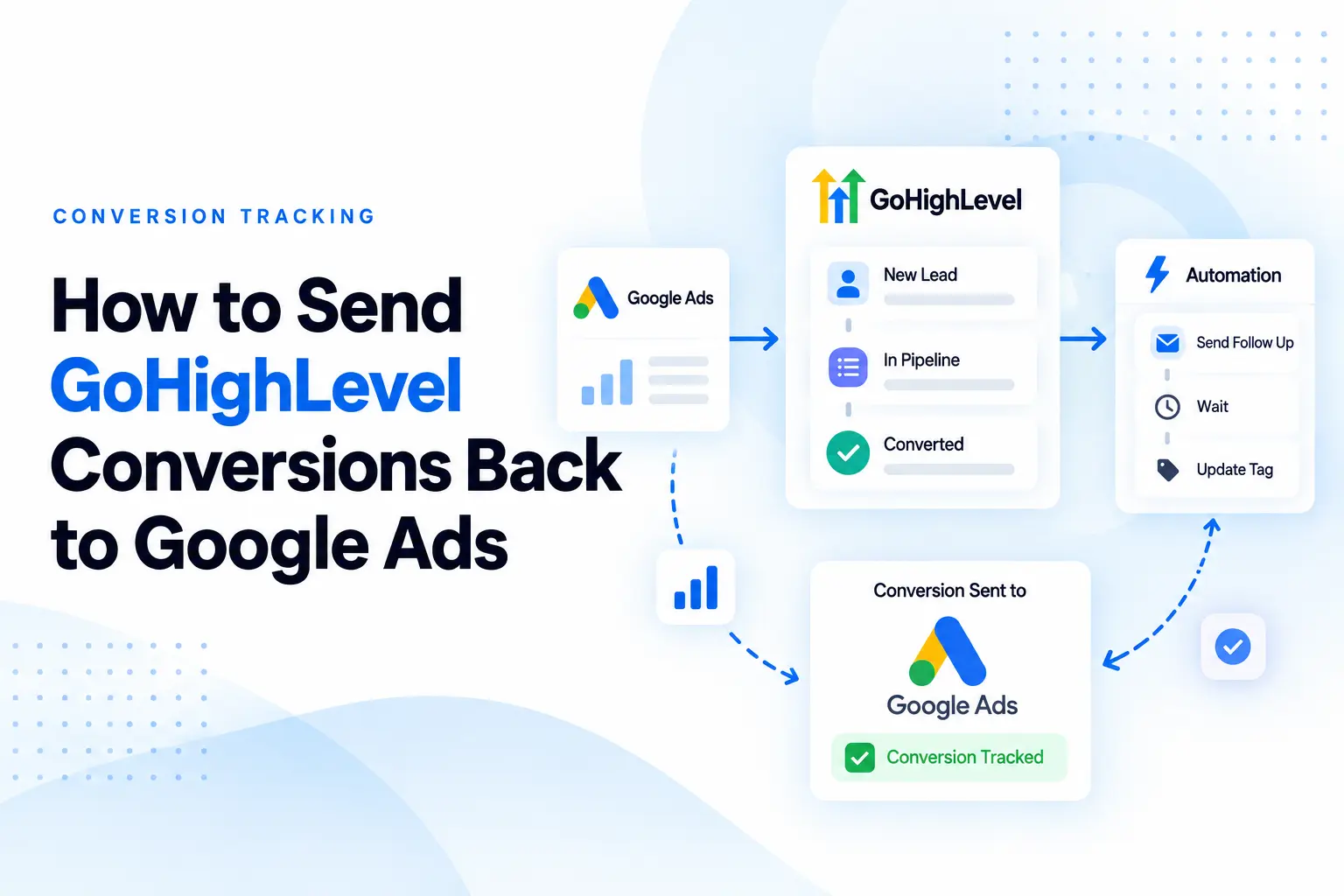
This guide shows how we close that loop at NexaMed. We capture the Google Click ID (GCLID) when a lead comes in, store it in GoHighLevel, and send qualified leads, booked appointments, and closed patients back to Google Ads as they move through the pipeline.
It's written for hormone clinics, med spas, weight loss practices, and other cash-pay practices that run Google Ads and use GoHighLevel, or are about to.
You send GoHighLevel conversions back to Google Ads by storing each lead's Google click ID on their contact record. Then you fire HighLevel's Add to Google Ads workflow action when the lead reaches a meaningful pipeline stage. Google matches the click ID to the original ad click and credits that campaign and keyword with the conversion.
The setup, in five steps:
The rest of this guide covers each step, the mistakes that quietly break the setup, and the healthcare privacy rules most GoHighLevel tutorials skip.
Google Ads optimizes toward whatever you tell it counts as a conversion. If the only conversion it sees is a form fill, it gets very good at finding people who fill out forms. That's not the same as finding people who become patients.
Here's a made-up example that looks a lot like accounts we audit. Two campaigns, similar spend:
On a lead report, Campaign A wins easily. On the revenue report, it isn't close: Campaign B produced five times as many patients for slightly less money.
Without CRM data flowing back, both you and Google's bidding only see the first version. The cheap campaign gets more budget, the good one gets trimmed, and everyone wonders why the phones are busy, but the schedule isn't full.
Once your pipeline reports back, the questions get better. Not "which keyword gets the cheapest lead," but which keyword produces booked consults, which campaign produces patients, and which service is actually worth scaling.
A GCLID (Google Click Identifier) is a unique ID Google adds to your landing page URL when someone clicks your ad with auto-tagging on. You'll see it at the end of the address as ?gclid=CjwKCAjw....
To you, it's a random string. To Google, it points to one specific click: the campaign, ad group, keyword, ad, and time. Send that ID back with "this person booked a consultation," and Google can credit the exact click that started it.
iPhone traffic sometimes arrives with a GBRAID or WBRAID instead of a GCLID because of Apple's privacy rules. HighLevel's Add to Google Ads action accepts all three, so capture all three.
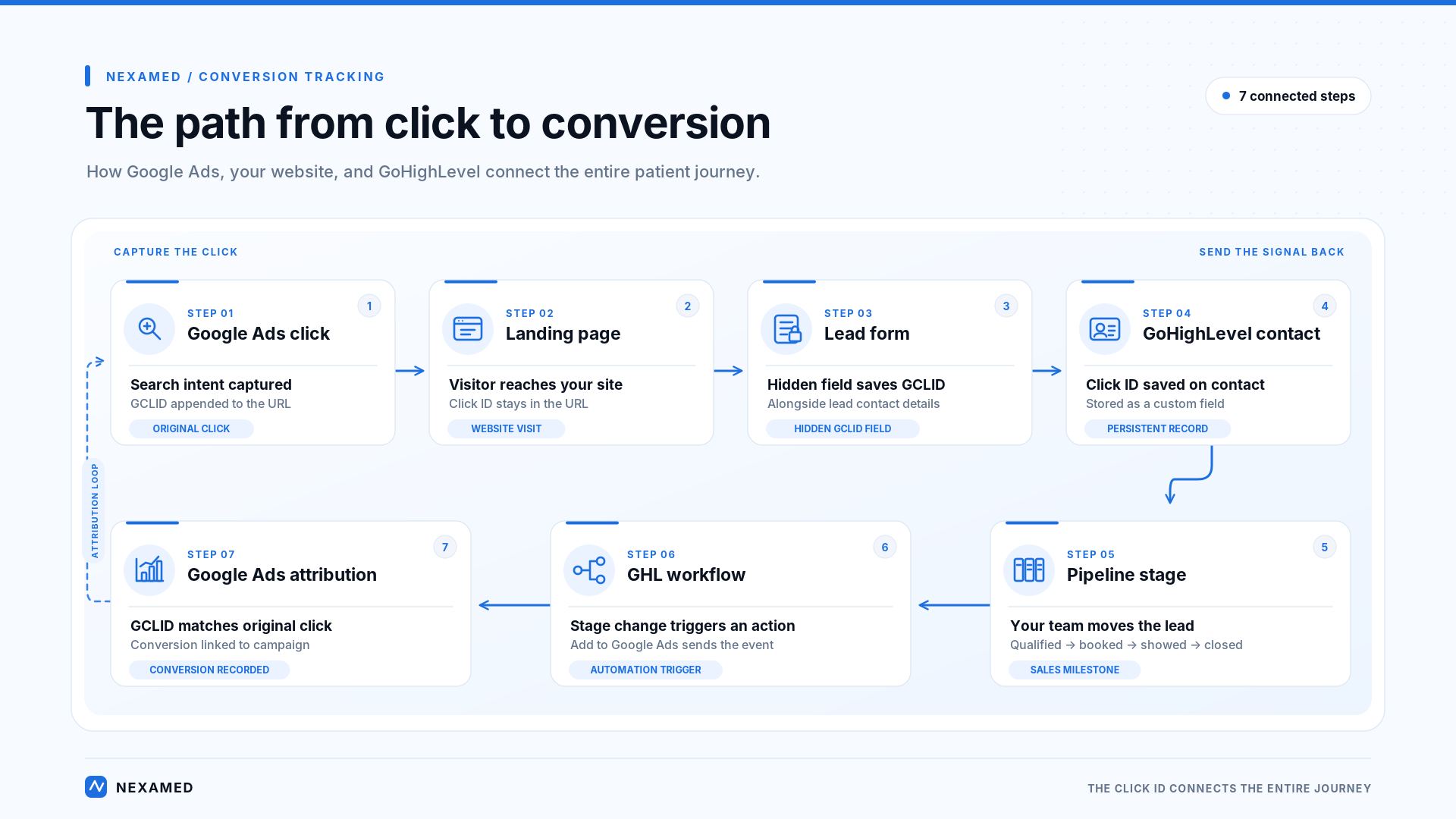
The form fill itself is still tracked the normal way, with the Google tag on your site. The CRM adds everything that happens after the form.
This is the setup we use on client accounts. The details shift depending on whether your forms live on GoHighLevel, Webflow, WordPress or somewhere else, but the order doesn't.
In Google Ads, auto-tagging lives under Admin → Account settings. It's on by default in most accounts, but check it. Nothing below works without it.
Then make sure nothing strips the ID before your form sees it. The usual suspects:
The fix for the last two is the same. When someone lands, save the GCLID to a first-party cookie (90 days is a sensible lifespan), then read it back into the form wherever the form lives. Google's offline conversion setup guide includes a sample script that does exactly this.
Quick check: open your landing page with ?gclid=test123 added to the URL, click through to the form and submit it. If test123 doesn't show up on the contact, something in the chain is dropping it.
Every lead form that Google Ads traffic can reach needs a hidden field for the GCLID, and ideally GBRAID and WBRAID too. The visitor never sees it. On submit, it carries the click ID along with the rest of the form.
Native GoHighLevel forms pick up click IDs from the page URL at the moment of submission. That works when the ad lands directly on the page with the form. It falls apart in the multi-step and embedded setups from Step 1.
Create a custom contact field called GCLID under Settings → Custom Fields. This is where the ID lives for as long as the contact exists. That matters, because the closed-patient conversion might fire six weeks after the form.
Our forms post to GoHighLevel through a webhook. The payload carries the usual lead details plus the click ID:
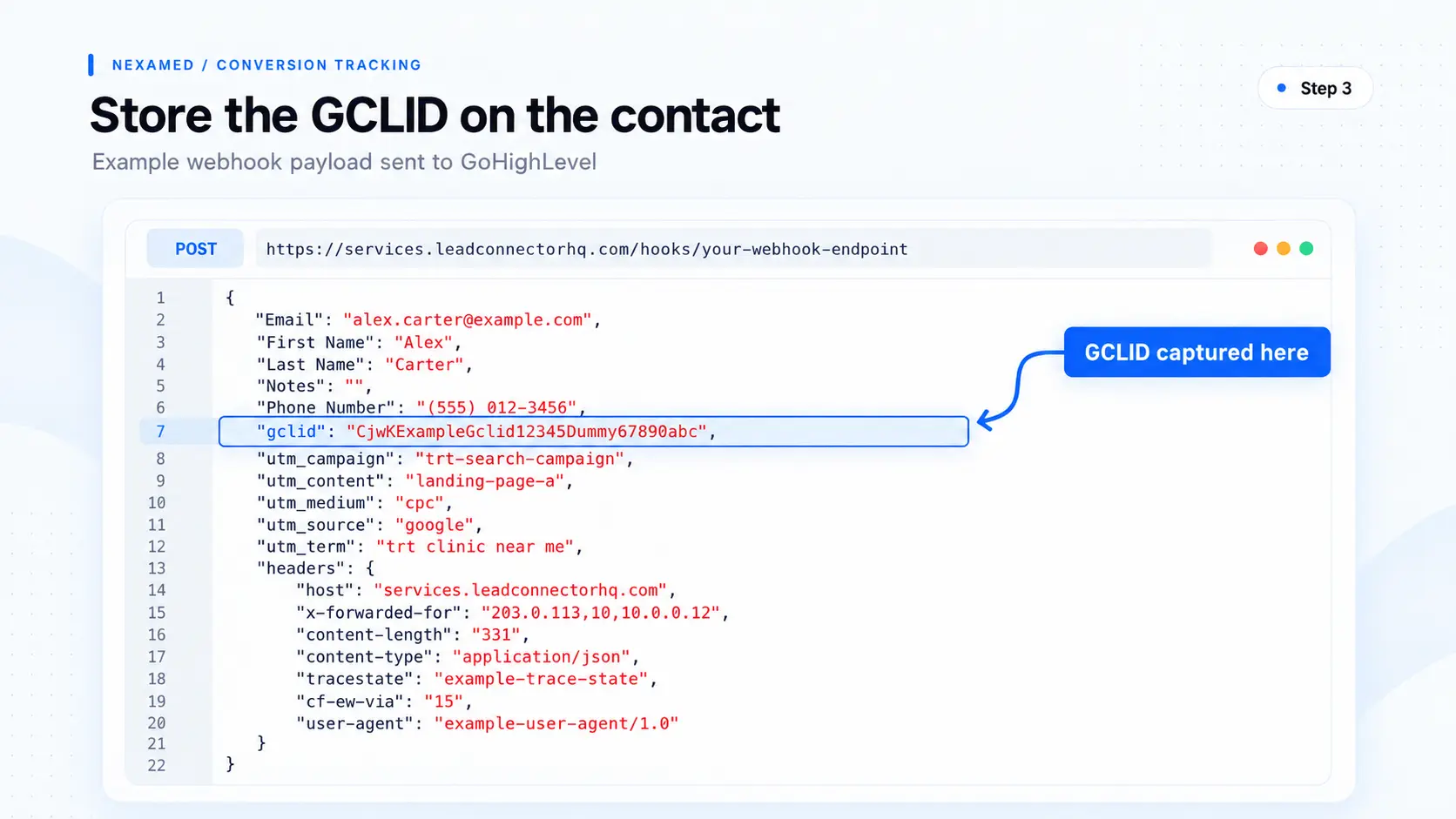
A workflow with the Inbound Webhook trigger creates or updates the contact and maps the gclid value into the GCLID custom field. Open a few test contacts afterward and confirm the field is filled. If webhooks are new to you, start with our healthcare webhooks guide and our walkthrough on mapping webhook data into your CRM.
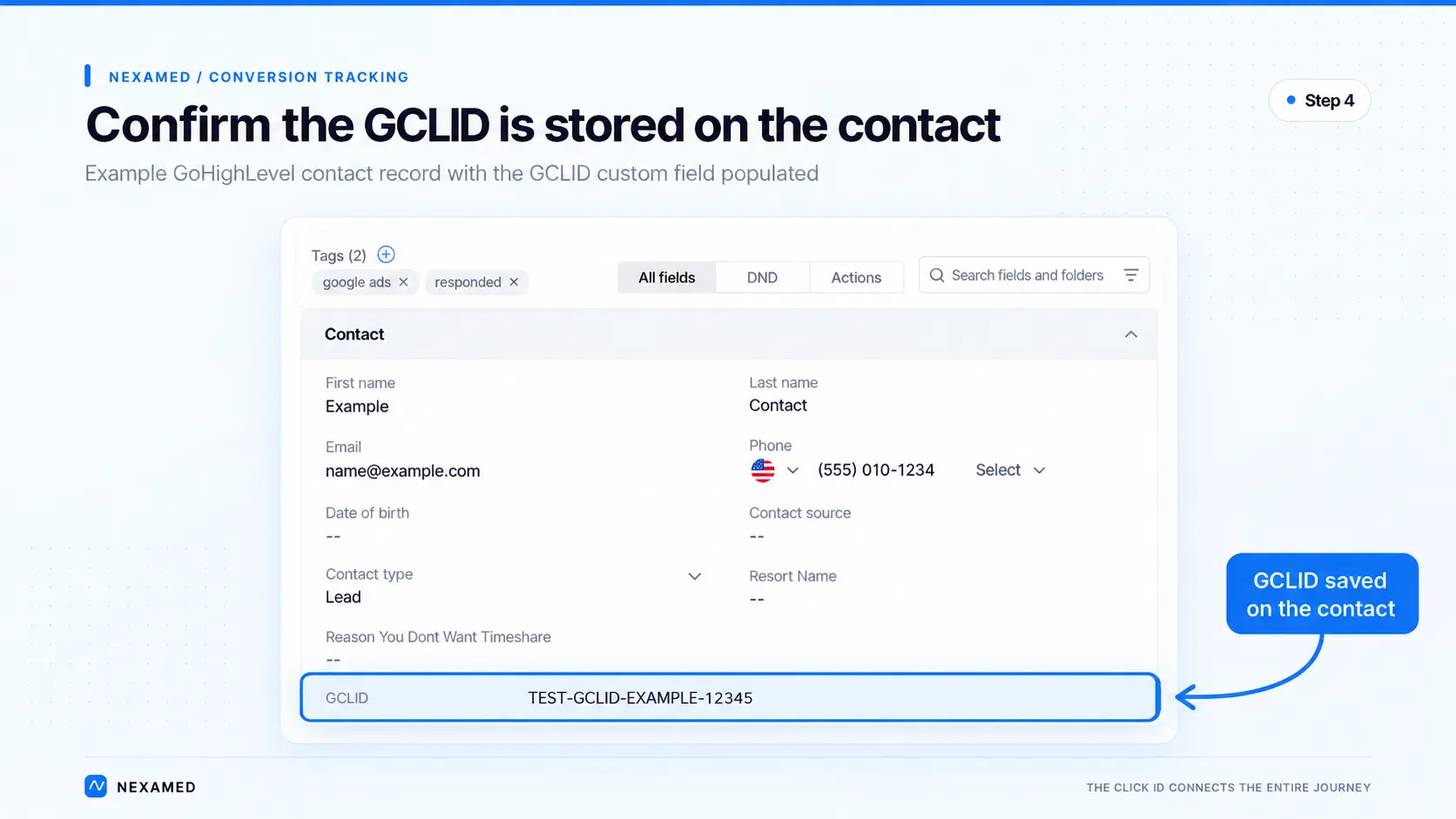
Save the source details while you're at it. Knowing a lead came from a specific Google campaign for a specific service lets you report on it inside GoHighLevel, not just inside Google Ads.
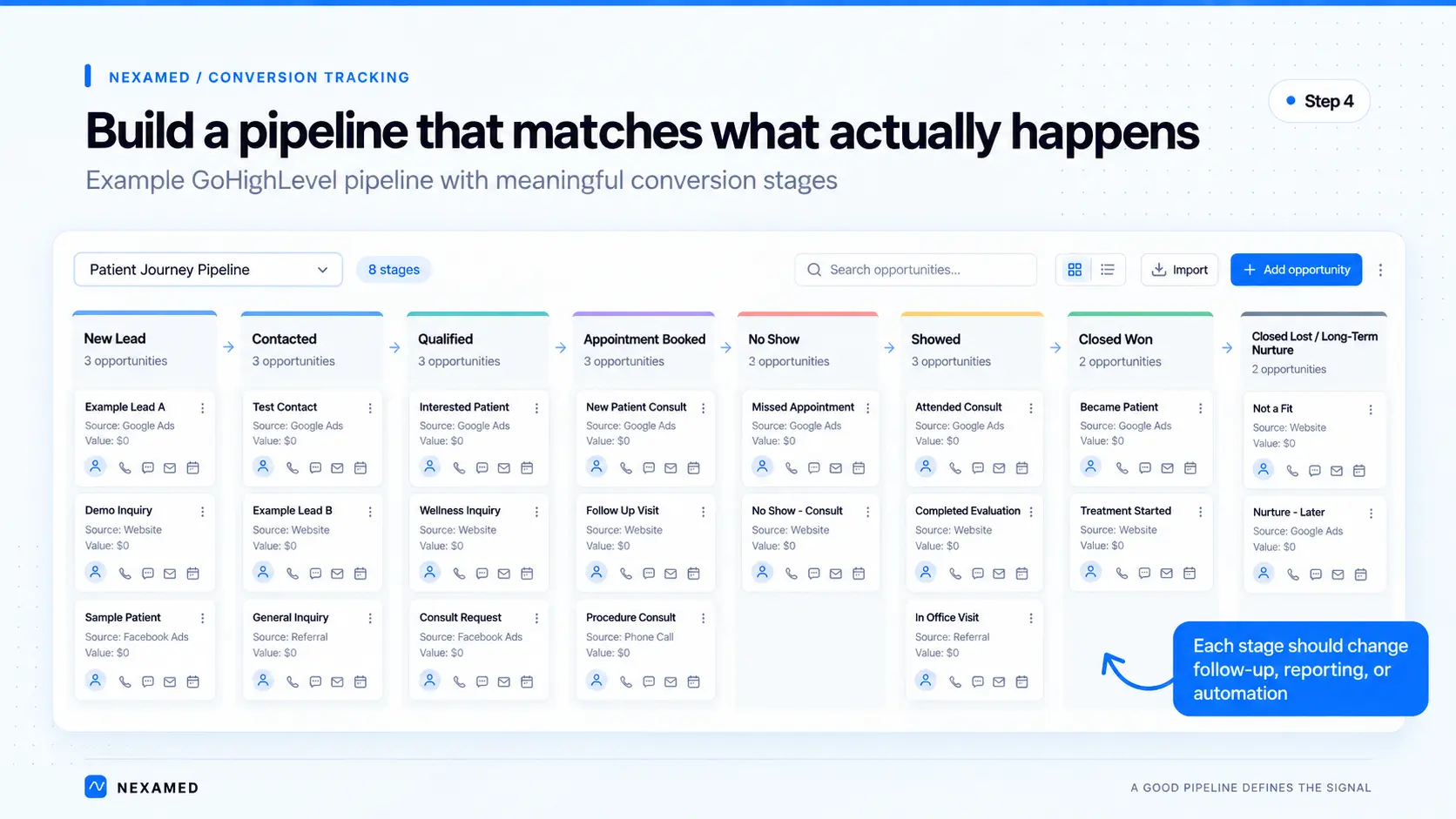
The pipeline triggers the conversions, so its stages need to mean something. A stage earns its place if it changes follow-up, reporting, automation or what staff do next. If it changes none of those, cut it.
This is the structure we start most practices with:
Write down what each stage means in one sentence and get the front desk to agree. "Qualified" at a hormone clinic might mean labs are ordered. At a med spa it might mean they've confirmed the treatment, budget and timing.
Whatever the definition, apply it the same way every time. Google will treat every move into that stage as a real signal.
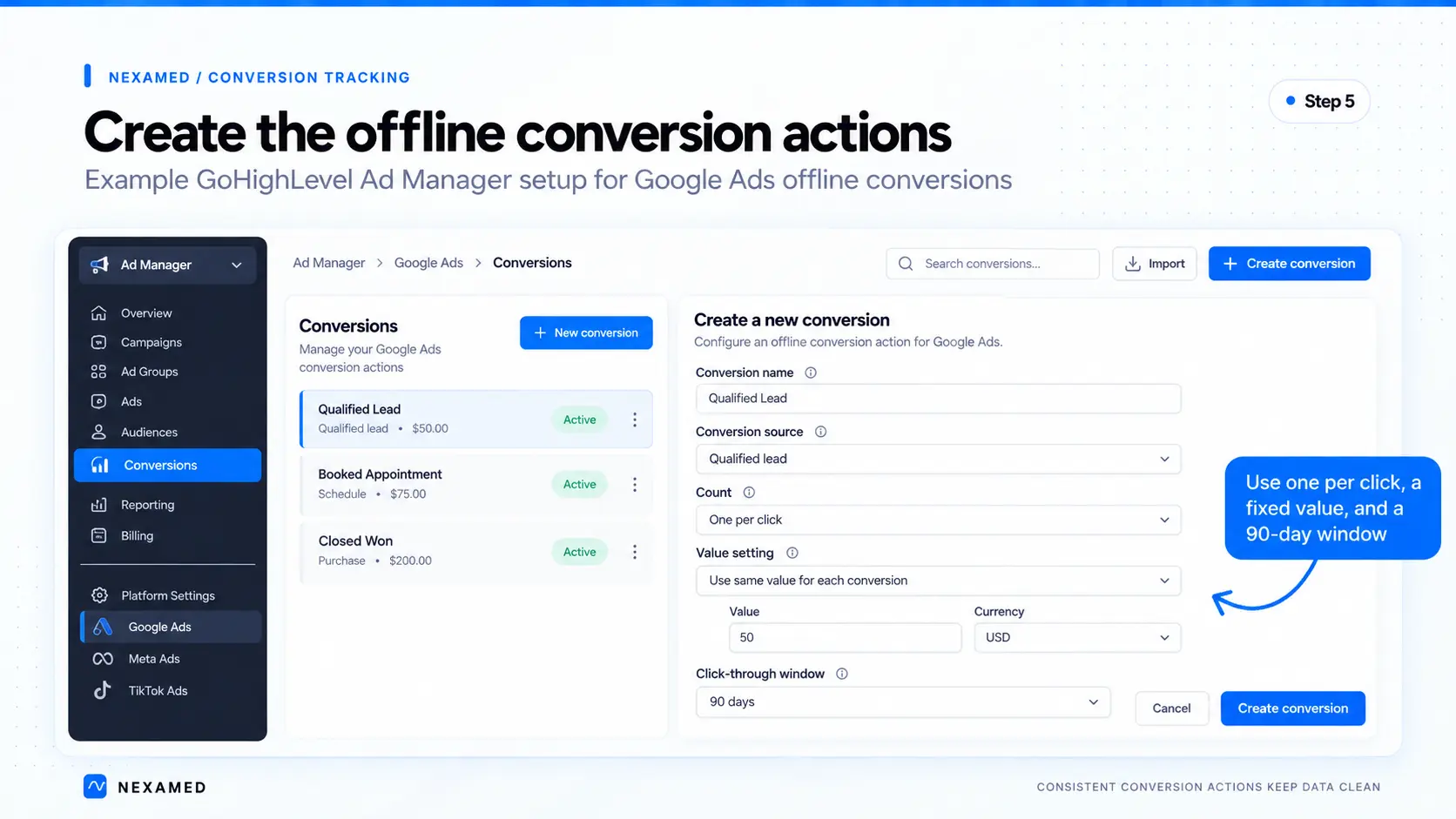
You need one conversion action per stage you want to send. Create them in Google Ads (Goals → Conversions → Create conversion action → Conversions offline), or inside GoHighLevel's Ad Manager settings, which creates them in your Google Ads account through the API.
The settings that matter:
Two gotchas. Google says to wait 4 to 6 hours after creating a new offline conversion action before sending anything to it. And GBRAID and WBRAID only work with Many per click actions, so iPhone leads without a GCLID won't register on One per click actions. We accept that trade for cleaner counting.
Each conversion gets its own workflow. Here's the Booked Appointment version:
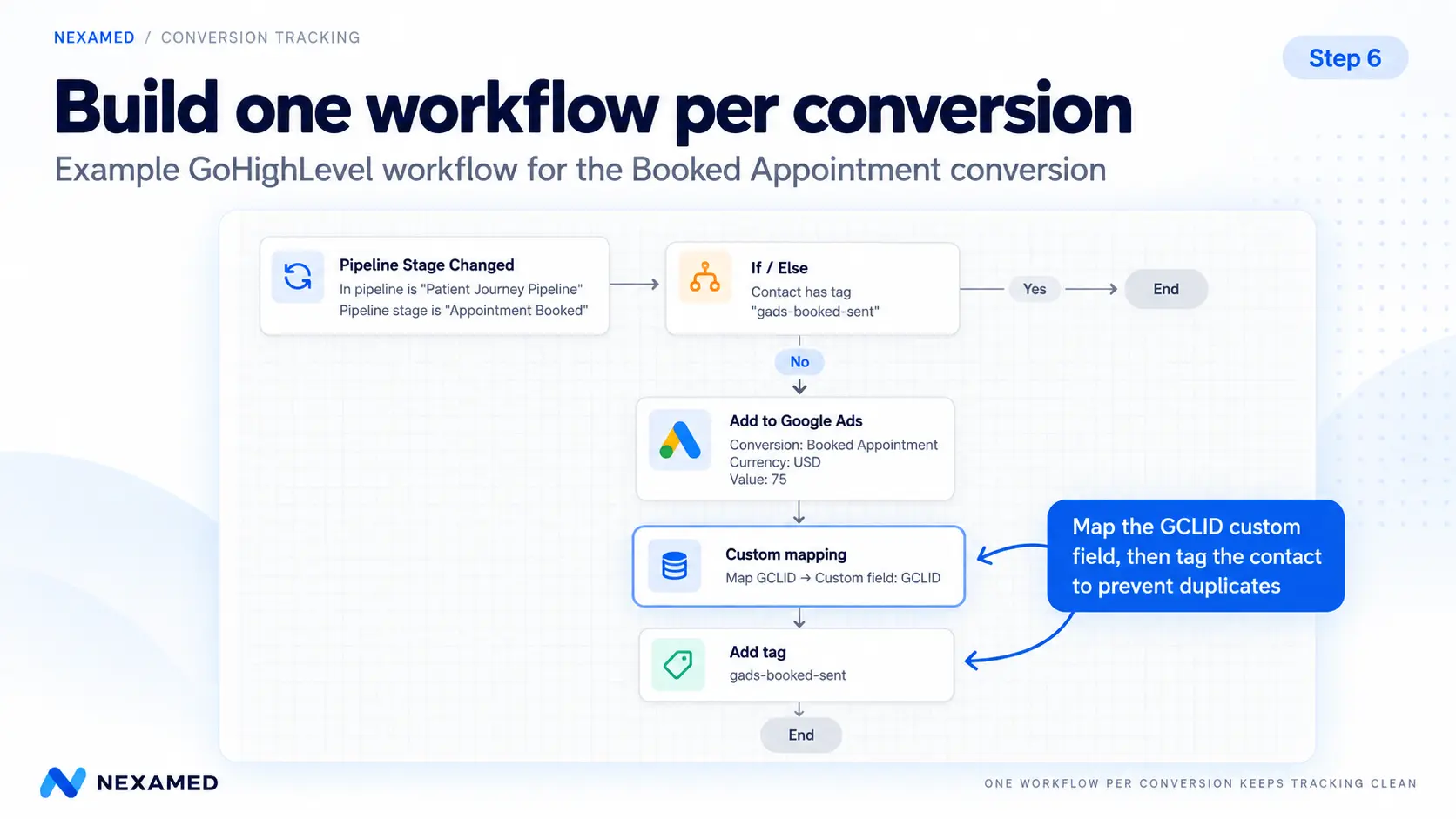
Also turn off Allow Re-entry in the workflow settings. Between that setting, the tag and One per click counting, a lead who gets bounced between stages by mistake still counts once.
The conversion name in the action has to match the name in Google Ads exactly, capitalization and spacing included. If it doesn't, the action gets skipped.
We walk through the full build, screenshots included, in [LINK: How to Send Booked Appointments From GHL to Google Ads] and [LINK: How to Send Closed Patients Back to Google Ads].
HighLevel doesn't have a test button for this action, so you test with real records:
Send several stages. Optimize for one.
Think of your conversions as a ladder:
Each rung is rarer and more valuable than the one below it. The trap is jumping straight to the top.
Aidan, who runs paid media with us, describes it as teaching Google the stages instead of going from zero to a hundred. If Google only hears about the five patients and never the hundred leads before them, it has very little to learn from.
In Google Ads, every conversion action is either primary or secondary. Primary actions feed bidding and the Conversions column. Secondary actions are tracked and reported, but bidding ignores them.
A sensible starting point for most practices: keep the lead as the primary conversion, and add qualified, booked and closed as secondary. You get full-funnel reporting right away without starving the algorithm.
No spend threshold flips the switch. The real question is whether a stage has enough steady volume for Google to find patterns.
Ten new patients a month can be a great month for a practice and still be thin data for an algorithm. Once booked appointments come in every week without big gaps, making them primary starts to make sense. Closed patients usually come last, if ever.
We go deeper on this decision in [LINK: Should Google Ads Optimize for Leads, Appointments or Patients?].
If you ever want Google to bid on revenue with target ROAS, it needs conversion values. A fixed value per stage is enough to start. Real revenue on Closed Won is better once your team records it consistently.
This is the most common failure and the hardest to spot, because leads still come in. Redirects, multi-step funnels and embedded forms are the usual causes. Spot-check a few Google Ads contacts every month: if the GCLID field is blank, nothing downstream is reaching Google.
A lead who replies to your text ten times is not ten qualified leads. A patient bumped from Booked back to Contacted and back to Booked is still one booking. Build every workflow to fire once per contact, and don't count on Google to clean up duplicates for you.
The automation only knows what the pipeline says. If the front desk books a consult and leaves the lead in New Lead, Google never hears about it. If someone marks everyone Closed Won to tidy up the board, Google learns from garbage.
Mark no-shows as no-shows instead of deleting them. Rebooking sequences can run, and the numbers stay honest.
A Closed Won that fires four months after the click falls outside the 90-day window and gets rejected. For treatments people take a long time to decide on, booked appointments are often the more reliable signal.
If qualified, booked and closed are all primary, one patient can count three times toward bidding. Google then chases whatever stage is most common. Pick one primary stage and keep the rest secondary.
This area changes often. Starting June 15, 2026, Google moved offline conversion and enhanced conversions for leads uploads to its Data Manager API and began blocking them in the Google Ads API for most developers (Google). If a custom script or older integration stopped sending conversions this summer, check that first.
Most GoHighLevel tutorials skip this part, and for a medical practice it matters most. None of this is legal advice. It's what we check before turning anything on, and what we'd want a practice to review with healthcare counsel.
Google now recommends enhanced conversions for leads for new setups. It matches conversions using hashed email addresses and phone numbers in addition to the click ID. For most businesses, that's an upgrade.
For medical practices, it's a problem. Google's customer data policies say conversions tied to health or medical information, including purchases of medical services and prescription drugs, can't be used for measurement in enhanced conversions. A new TRT patient or a Botox purchase falls squarely in that category, and arguably so does the consult request itself.
So for patient-stage conversions, we send click IDs only (GCLID, GBRAID, WBRAID) and no hashed contact details. Since April 2026, enhanced conversions is a single on/off setting inHIPAA-coveredAds account, so check what's switched on in yours.
If a practice is a HIPAA covered entity, and most practices that bill insurance electronically are, tying an identifiable person to their care and sending it to an ad platform can be an impermissible disclosure. HHS has published guidance on tracking technologies specifically. A federal court vacated part of it in 2024, so read the current version rather than an old summary.
Google Ads conversion tracking also isn't covered by a Google business associate agreement (BAA).
Many cash-pay med spas and clinics aren't covered entities, but decide that deliberately rather than assuming it. Several states also have consumer health privacy laws that apply regardless of HIPAA. Washington's My Health My Data Act is the best known. For the CRM side, see our GoHighLevel HIPAA setup guide.
Whatever your status, send Google the least you can:
The point of this system is better bidding. Google doesn't need to know what someone is being treated for to bid better.
Better bidding is the headline benefit. The bigger one is that the same pipeline data shows where patients get lost, so you fix the right problem.
Out of every 100 Google Ads leads:
Without the pipeline, every one of those looks like "the ads aren't working." We dig into that in why your healthcare marketing isn't failing, your sales process is.
The same stage changes that send conversions should change what the lead receives:
The first few minutes matter most, which is why we wrote a full guide on speed to lead. Old leads that never booked are worth working too.
Calls count too
Plenty of Google Ads leads never touch a form. If calls aren't tracked into GoHighLevel, a big share of your best leads is invisible to this whole system.
If bookings and payments happen in OptiMantra, Cerbo or another EHR, the pipeline only stays accurate if those events flow back into GoHighLevel. That's what the integration is for. We've covered connecting OptiMantra to your CRM and the Cerbo + GoHighLevel integration
Meta leads behave differently
The same thinking applies to Meta, with one difference. Someone who searched "testosterone clinic near me" and someone who tapped an Instagram ad mid-scroll are not the same lead. Keep the source on every contact so you can report on them separately and follow up differently.
Yes. Connect Google Ads under Settings → Integrations, then use the Add to Google Ads workflow action to send conversions like qualified leads, booked appointments or closed patients. The be attributed to a GCLID, GBRAID or WBRAID from the original ad click for the conversion to attribute.
In a custom contact field, filled from a hidden form field when the lead is created. Then turn on custom mapping in the Add to Google Ads action and point it at that field.
Usually one of two reasons: the contact has no click ID, or the conversion name in the workflow doesn't exactly match the name in Google Ads.
Both are taking conventional actions. Booked appointments arrive sooner and in higher numbers, which makes them the better bidding signal for most practices. Closed patients are best used for reporting until you have steady volume.
Up to the conversion action's click-through window, which maxes out at 90 days. Anything older is rejected, so set patient-stage actions to 90 days.
Yes. Keep tracking form submissions and calls the normal way. Offline conversions add what happens after the lead; they don't replace it.
Be careful. Google's customer data policies don't allow conversions based on health or medical information, such as purchases of medical services, to be measured with enhanced conversions. For patient-stage conversions, we send click IDs only.
Yes, as long as the booking or payment makes it back into GoHighLevel and moves the opportunity. That usually means an integration between the EHR and GoHighLevel.
NexaMed is a healthcare marketing agency for hormone clinics, med spas, longevity clinics, sexual wellness clinics, and telehealth practices. We build the whole system: Google Ads, GoHighLevel pipelines and follow-up, EHR integrations, and the conversion tracking that ties them together.
If your reporting stops at the form fill and you can't say which campaigns produce patients, reach out through our contact page.
You’ve outgrown "basic" marketing. Nexamed builds the advanced lead-gen infrastructure your med spa needs to capture high-ticket patients and scale without the manual mess.
Keep up to date with medspa marketing strategies.
.png)